
The Perfect Pair
One system. One remote. No added complexity.
"We have a couple Flex VRA systems and find that they work really well with our kiddos!"
Chelsea Blankenship, Au.D., PH.D., Cincinnati Children's Hospital
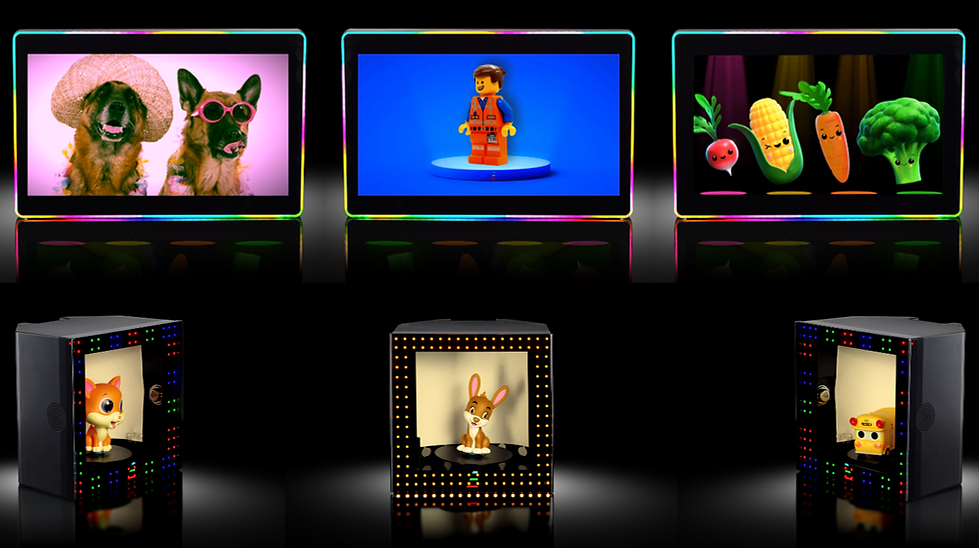
Flex VRA Combo System Configurations
R=Right L=Left C=Center


FLEX-RLC-FLEXTOY-RLC
Right, Left, and Center Monitor
Right, Left, and Center Toy
2 Remote Controls
Flex PC
Audiometer Integration
$9,900
FLEX-RLC-FLEXTOY-RL(most popular)
Right, Left, and Center Monitor
Right and Left Toy
2 Remote Controls
Flex PC
Audiometer Integration
$9,200
FLEX-RL-FLEXTOY-RLC
Right and Left Monitor
Right, Left, and Center Toy
2 Remote Controls
Flex PC
Audiometer Integration
$7,700


FLEX-RL-FLEXTOY-C
Right and Left Monitor
Center Toy
2 Remote Controls
Flex PC
Audiometer Integration
$6,000
FLEX-C-FLEXTOY-RL
Center Monitor
Right and Left Toy
2 Remote Controls
Flex PC
Audiometer Integration
$4,700
International customers: Prices shown are in USD and exclude shipping, duties, and taxes.
Pricing does not include the cost of shipping, applicable taxes, and installation.
Sold through authorized distributors.
We believe pricing transparency saves clinicians time. You can read more about why we post prices online here.
Audiometer Integrations
Included with every Flex VRA Combo System
Audiometer Integration Cable
Directly interfaces with the GSI Audiostar Pro and the Interacoustics EVO and wirelessly activate with the Flex VRA on the audiometer keys.


Flex PC
The Remote
Two Remote Controls Included With Every Flex VRA Combo System

TOY
Toggles to physical toy mode so that only toys respond to activators
DISTRACT
Use the VRA monitor as a focal point to keep patients still during tympanometry, otoscopy, or OAE testing.
LIGHTS
ON/OFF
Turn on (top button) and off (bottom button) the 360 degree LED light bar while playing video content.
ACTIVATORS
Left (Blue), Right (Red), and Center (Green)
LIGHTS
ONLY
Activate the 360 degree light bar only while an activation button is pressed down. Toggles video mode on.
VIDEO
Display videos of cartoons of cartoons and live-animals while an activation button is held down. Toggles video on
VOLUME
CONTROL
Volume up, down, and mute control of the VRA monitors.
Custom content comes standard with preloaded Hey Bear Sensory content, but any content can be loaded by the end user. Toggles video on.
CUSTOM


New Features
Targeted Content
Targeted Content is a feature in Flex VRA that lets the clinician pre-select exactly what video or stimulus will play when a specific button is pressed, before the test even begins.
Instead of choosing content on the fly and hoping it connects with the child, Targeted Content flips the model. The child comes first, and the stimulus is chosen specifically for them.
House Rules
House Rules is a software feature in Flex VRA that lets clinicians set fixed behavior rules for a VRA monitor, most commonly the center screen, so it behaves exactly the way the audiologist wants during testing regardless of what stimuli are changed on the left and right monitors.
House Rules reflects how Flex VRA approaches software driven VRA design. Instead of forcing clinicians to adapt to the system, the system adapts to how clinicians choose to run the test.
Conditioned Play Audiometry Games
Included with every Flex VRA Combo System

Bubble Game

Farm Game

Bucket Game
"Listen for the tone and when you hear the beep, touch one of the colored balls and drag it over into the bucket!"

Dynamic SRT Pictured Words Board

Diagrams Application

Who is
Hey Bear Sensory?


Hey Bear Sensory designs sensory-based content for children. Hey Bear has quickly gained popularity on YouTube, and within the last 10 years has amassed over 3 million subscribers, boasts approximately 2.5 billion views, and has a constant audience of thousands watching live every day.
Flex VRA entered into an exclusive content licensing agreement with Hey Bear Sensory to provide the default custom content that will ship with every Flex VRA system.
By combining Hey Bear's insanely popular content with the Flex VRA, we can provide the most engaging and positive VRA experience to audiologists and their patients.


